Memory System Overview
Chorum’s memory system gives your AI persistent knowledge about your projects—patterns you use, decisions you’ve made, and rules that must never be broken.
Why This Matters
Most AI chat apps forget everything when you start a new session. You end up repeating yourself: “Remember, we use Zod for validation” or “Don’t use any types in TypeScript.”
Chorum remembers. When you switch projects or start a new conversation, your AI already knows the context.
Core Concepts
The Conductor
At the heart of Chorum’s memory system is the Conductor — the intelligence layer that decides what knowledge reaches the AI for each response. It scores every memory by relevance, selects the best ones within a token budget, and injects them into the prompt.
The Conductor works silently by default. After each response, you’ll see a subtle line: “Chorum remembered 3 things for this response.” Expand it to see what was injected, pin items you always want, or mute items you’ve internalized.
See The Conductor for the full guide on visibility, controls, and tuning.
Project Memory
Each project in Chorum has its own isolated memory space. Patterns you establish in your “ChorumAI” project don’t leak into your “Marketing Site” project.
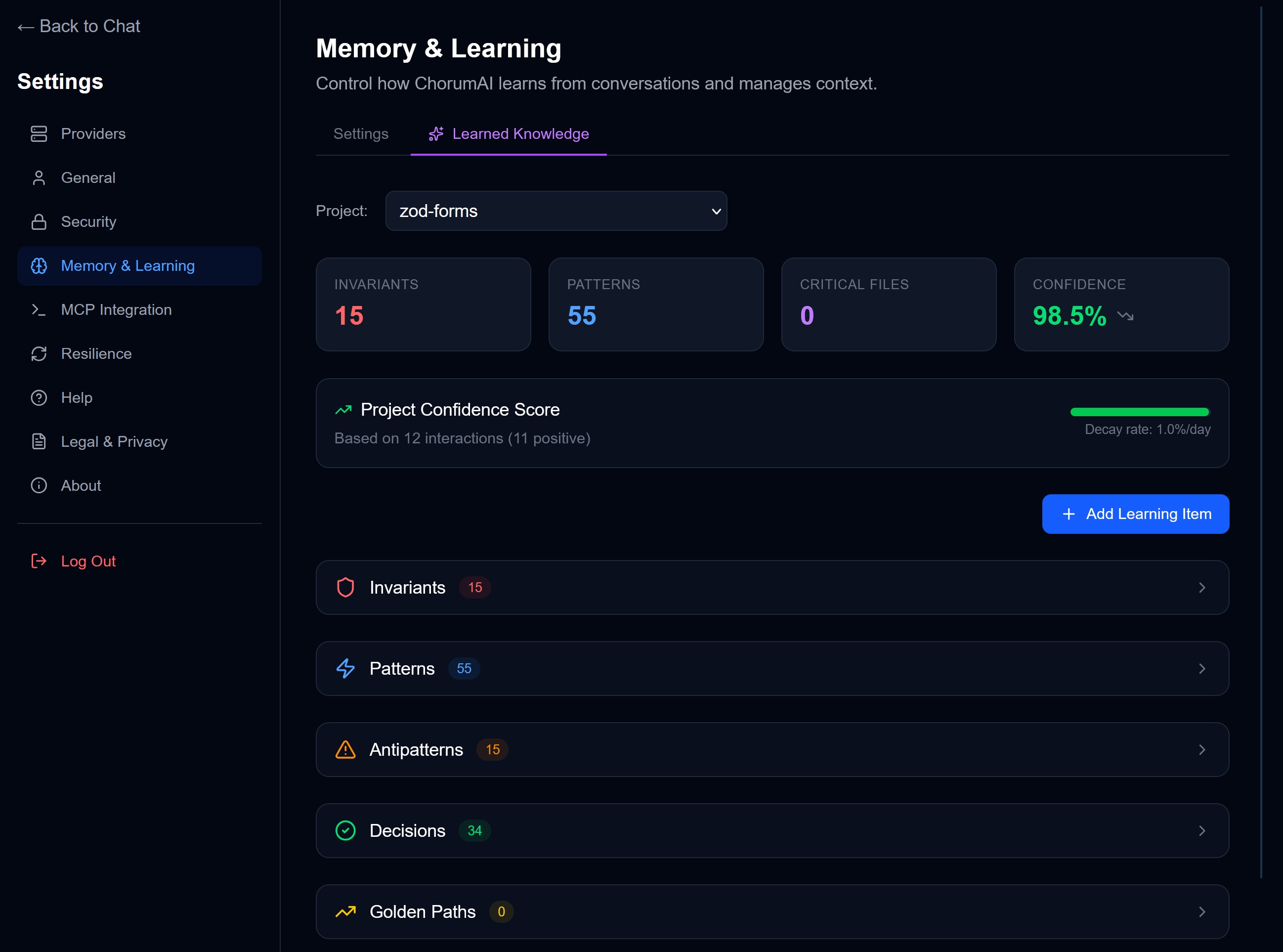
Learning Paths
Chorum extracts and stores five types of knowledge:
| Type | What It Captures | Example |
|---|---|---|
| Patterns | Conventions, recurring approaches | ”Use early returns to reduce nesting” |
| Decisions | Choices with rationale | ”Chose PostgreSQL over SQLite for multi-user support” |
| Invariants | Rules that must never be violated | ”All API routes require auth middleware” |
| Golden Paths | Step-by-step procedures and recipes | ”To deploy: run tests, build, push to main, verify staging” |
| Antipatterns | Things to avoid | ”Don’t use any type in TypeScript” |
→ See Learning Types for detailed explanations.
Embeddings
Under the hood, every learning is converted to a vector embedding—a numerical representation that captures its meaning. This enables semantic search: you can ask “What’s our error handling approach?” and find relevant patterns even if they don’t contain those exact words.
Memory Lifecycle
┌──────────────┐     ┌──────────────┐     ┌──────────────┐     ┌──────────────┐
│    LEARN     │ ──► │    STORE     │ ──► │   RETRIEVE   │ ──► │    INJECT    │
│              │     │              │     │              │     │              │
│ Extract from │     │ Embed +      │     │ Score by     │     │ Add to       │
│ conversation │     │ persist      │     │ relevance    │     │ LLM context  │
└──────────────┘ └──────────────┘ └──────────────┘ └──────────────┘- Learn — Chorum analyzes conversations to extract patterns, decisions, and invariants
- Store — Each learning is embedded and stored with metadata (type, timestamp, source). Chorum checks for semantic near-duplicates (>85% similar) and merges them instead of creating bloat.
- Retrieve — The Conductor scores and ranks memories by relevance, respecting your pins, mutes, and Memory Depth setting
- Inject — Selected memories are injected into the LLM’s context, adapted to the model’s size via Tiered Context
Automatic vs. Manual Learning
Automatic Extraction
After each conversation turn, Chorum can analyze the exchange and extract learnings. The analyzer looks for:
- Explicit decisions: “Let’s use Zod instead of Yup”
- Established patterns: “We always validate input before processing”
- Stated constraints: “Never log PII to console”
Extracted learnings appear in your Pending Learnings queue for approval before being added to memory.
Manual Addition
You can also add learnings directly:
- Go to Settings → Memory & Learning → Learned Knowledge
- Click + Add Learning Item
- Choose type (Pattern, Decision, Invariant, or Antipattern)
- Enter the content
- Save
Manual learnings bypass the approval queue—they’re added immediately.
How Memory Affects Responses
When you send a message, the Conductor:
- Classifies your query — intent (debugging? generation?), complexity, and domains
- Selects the right memory tier based on your model’s context window (see Tiered Context)
- Scores relevant learnings — using semantic similarity, recency, domain overlap, co-occurrence, and your project’s Memory Depth setting
- Filters — muted items are excluded; pinned items are always included
- Injects the highest-scoring items into the system prompt
After the response, you’ll see what was injected — and you can pin, mute, or give feedback on individual items.
The AI sees something like:
<chorum_context>
## Active Invariants
- Always use Zod for runtime validation
- Never store secrets in environment variables without encryption

## Relevant Patterns
- This project uses the repository pattern for data access
- Error handling follows the Result<T, E> pattern

## Recent Decisions
- Chose PostgreSQL over SQLite for multi-user support (Jan 20)
</chorum_context>
This context grounds the AI in your project’s reality, reducing hallucinations and ensuring consistency.
Project Confidence
Each project has a confidence score (0-100) that reflects how well Chorum “knows” that project. Higher confidence means:
- More aggressive memory injection
- Lower relevance thresholds
- More trusted responses
Confidence increases with usage and diverse interactions. It decays slowly over time if you don’t use that project.
→ See Confidence Scoring for details.
Related Documentation
- The Conductor — See, steer, and tune what Chorum remembers
- Learning Types — Deep dive into patterns, decisions, invariants
- Relevance Gating — How the scoring engine works under the hood
- Tiered Context — How memory adapts to different model sizes
- Confidence Scoring — How project confidence works
- Memory Management — Viewing, editing, and deleting learnings
- MCP Integration — Exposing memory to external agents
“Memory isn’t just storage—it’s knowing what matters for this moment.”