Learning Types
Chorum’s memory system stores distinct types of knowledge, each serving a different purpose. The system is domain-aware — when your project is about code, it extracts patterns, decisions, and invariants. When it’s about creative writing, it extracts characters, settings, plot threads, and more. Understanding these types helps you curate your project’s memory effectively.
Why This Matters
Not all knowledge is the same. A coding convention (“use early returns”) is different from a critical rule (“never expose PII”). Chorum treats them differently—invariants get priority injection, patterns build over time, decisions capture context.
Code Domain Types
These are the default extraction categories for coding, devops, data, and general projects.
1. Patterns
What they are: Recurring approaches, coding conventions, and established ways of doing things in your project.
How they’re used: Patterns help the AI match your project’s style. When generating code, the AI references your patterns to produce consistent output.
Examples:
✓ "Use early returns to reduce nesting in handler functions"
✓ "Prefer named exports over default exports"
✓ "Use const for all variable declarations unless reassignment is needed"
✓ "Format error messages as: [Module] Error: {message}"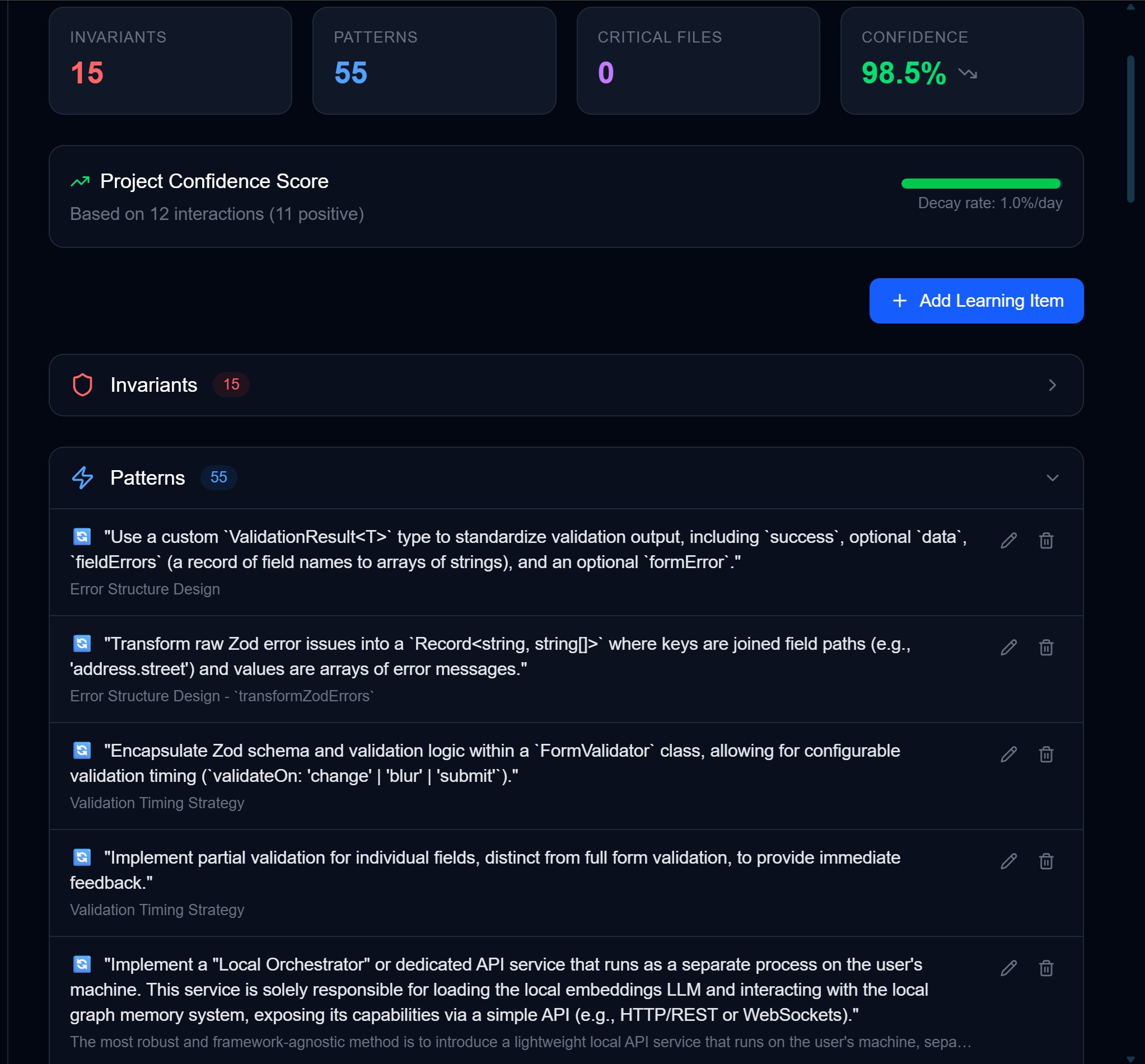
When to add manually: When you notice the AI generating code that doesn’t match your style, add a pattern to correct it.
2. Decisions
What they are: Technical choices you’ve made, along with the reasoning behind them.
How they’re used: Decisions prevent the AI from re-litigating settled choices. If you’ve decided to use PostgreSQL, the AI won’t suggest MySQL.
Examples:
✓ "Chose PostgreSQL over SQLite for multi-user support and advanced query features"
✓ "Using Drizzle ORM instead of Prisma for better type inference and lighter bundle"
✓ "Went with Supabase Auth over rolling our own to reduce security surface area"
✓ "Selected Zod over Yup for schema validation—better TypeScript integration"
Key element: The “why”
A good decision includes rationale:
- ❌ “We use PostgreSQL” (just a fact)
- ✓ “Chose PostgreSQL over SQLite for multi-user support” (decision with context)
When to add manually: After significant technical discussions or architecture decisions, capture them while the reasoning is fresh.
3. Invariants
What they are: Rules that must never be violated. These are your project’s hard constraints.
How they’re used: Invariants get priority injection into context. They act as guardrails—the AI’s “senior engineer interrupting you” when you’re about to break a rule.
Examples:
✓ "Never use console.log in production code—use the logger service"
✓ "All API routes must include authentication middleware"
✓ "Never store secrets in environment variables without encryption"
✓ "PII must never be logged or sent to third-party services"
✓ "All database queries must use parameterized queries—no string concatenation"
Severity levels:
| Severity | Meaning | AI Behavior |
|---|---|---|
error | Critical rule | AI should refuse to generate violating code |
warning | Important guideline | AI should warn but may proceed |
When to add manually: After bugs caused by rule violations, security reviews, or establishing team standards.
4. Golden Paths
What they are: Step-by-step procedures, recipes, and “how-to” guides for recurring tasks in your project.
How they’re used: Golden paths help the AI guide you through established workflows. When you ask “how do I deploy?” or “how do I add a new API route?”, the AI follows your project’s actual procedure.
Examples:
"To add a new API route: create route.ts in app/api/, add auth middleware, validate input with Zod, write handler, add to OpenAPI spec"
"Deploy flow: run tests locally, push to main, verify staging build, run smoke tests, promote to production"
"New component checklist: create component file, add props interface, write unit test, add to Storybook, update barrel export"
When to add manually: When you find yourself explaining the same multi-step process repeatedly, capture it as a golden path.
Aging: Golden paths have a 30-day half-life — procedures get stale as tooling and processes evolve. If a golden path keeps being retrieved (10+ times), it gets automatically promoted to resist decay.
5. Antipatterns
What they are: Things to explicitly avoid. The inverse of patterns.
How they’re used: Antipatterns tell the AI what NOT to do. They’re especially useful for preventing repeated mistakes.
Examples:
✓ "Don't use the `any` type in TypeScript—always be explicit"
✓ "Avoid nested ternaries—use if/else for complex conditions"
✓ "Don't use synchronous file operations in API routes"
✓ "Never catch errors without logging them"
Difference from invariants:
| Antipattern | Invariant |
|---|---|
| ”Don’t use any type" | "All functions must have explicit return types” |
| Style/quality preference | Hard requirement |
| AI should avoid | AI must not violate |
When to add manually: When you notice recurring issues in AI-generated code, or after code reviews reveal common mistakes.
How Learning Types Affect Injection
When Chorum scores memory for relevance, each type gets a priority boost:
| Type | Priority Boost | Rationale |
|---|---|---|
| Invariant | +0.25 | Must not be violated — highest priority |
| Golden Path | +0.15 | Procedural guidance for recurring tasks |
| Pattern | +0.10 | Style consistency matters |
| Decision | +0.10 | Context prevents rehashing |
| Antipattern | +0.05 | Mistake prevention (boosted 2x during debugging) |
This means an invariant with the same semantic similarity as a pattern will rank higher and be more likely to be injected.
Writing Domain Types
When Chorum detects that your project is in the writing domain (via the Domain Signal Engine), the extraction system switches to a completely different set of categories tailored for creative work.
Instead of asking “what are the coding patterns?”, it asks “who are the characters?” and “what plot threads are still open?“
1. Characters
What they are: Named characters with their role, key traits, and relationships.
Examples:
✓ "Marcus is the protagonist, a retired detective haunted by his last case. Brother to Elena."
✓ "Dr. Voss is the antagonist, a neuroscientist who believes consciousness can be bottled."
✓ "Lily is Marcus's daughter, 12 years old, sees ghosts but doesn't tell anyone."
Decay: Never — characters are perpetual. Marcus is always Marcus.
2. Setting & Atmosphere
What they are: Time periods, locations, atmosphere, and sensory details that define the story’s world.
Examples:
✓ "The story takes place in 1987 Portland, rain-soaked and noir-tinged."
✓ "Marcus's apartment: third floor walkup, blinds always drawn, smells like coffee and regret."
✓ "Chapter 4 shifts to rural Montana — wide open, quiet, unsettling."
Decay: 365-day half-life — settings rarely change once established.
3. Plot Threads
What they are: Unresolved questions, setup/payoff pairs, foreshadowing, and story arcs.
Examples:
✓ "The locked drawer in Chapter 2 hasn't been opened yet — Chekhov's gun."
✓ "Elena mentioned a 'debt' in the prologue. Marcus doesn't know about it yet."
✓ "The recurring dream sequence (Chapters 1, 4, 7) is escalating — needs resolution."
Decay: 90-day half-life — plot threads stay relevant across chapters until resolved.
4. Voice & Style
What they are: POV type, tense, style markers, and prose quirks.
Examples:
✓ "First-person present tense, clipped sentences, avoids adverbs."
✓ "Dialogue has no attribution tags — speaker identity implied by cadence."
✓ "Internal monologue uses em-dashes heavily, never parentheses."
Decay: 365-day half-life — voice decisions are architectural, lasting the whole project.
5. World Rules
What they are: Established facts about the story’s reality — magic systems, technologies, physical laws that differ from our world.
Examples:
✓ "Ghosts can only be seen by people who have died and been resuscitated."
✓ "Time moves backward in the Mirror District — aging reverses inside."
✓ "Animals can sense the presence of ghosts; dogs growl, cats stare."
Decay: Never — world rules are the invariants of fiction. They define reality.
Future Domains
The domain-aware extraction system is designed to be extensible. Writing is the first non-code domain, but the architecture supports future additions:
- Research: Hypotheses, methodology decisions, sources, findings
- Business: Customer segments, pricing decisions, competitive observations
- Marketing: Audience personas, messaging, campaign performance
Until domain-specific extractors are built for these areas, projects in these domains use the general-purpose categories (patterns, decisions, invariants) with domain-adaptive prompting.
Automatic Extraction
Chorum’s pattern analyzer examines conversations and extracts learnings automatically. The extraction prompt looks for:
Patterns extracted when you say:
- “We always do X before Y”
- “The convention here is…”
- “In this project, we prefer…”
Decisions extracted when you say:
- “We chose X because…”
- “We decided to use X over Y”
- “The rationale for X is…”
Invariants extracted when you say:
- “Never do X”
- “Always ensure X before Y”
- “X must never be violated”
Antipatterns extracted when you say:
- “Don’t do X”
- “Avoid X because…”
- “X is problematic because…”
All automatic extractions go to Pending Learnings for your approval before being added to memory.
How Chorum Prevents Duplicate Knowledge
As you work with Chorum, the same concepts naturally come up in different conversations. You might say “use early returns to reduce nesting” in one session and “prefer early returns over deep nesting” in another. These are semantically identical—they mean the same thing—but the wording differs slightly.
The Problem: Near-Duplicate Bloat
Without deduplication, your memory corpus would accumulate near-duplicates:
✗ "Use early returns to reduce nesting"
✗ "Prefer early returns over deep nesting"
✗ "Always use early returns to avoid deep if/else chains"
All three express the same pattern, but they’d compete for injection budget space. When Chorum retrieves memory for a query, it has a token limit. If 3 slots are filled with variations of the same idea, that’s 2 wasted slots that could have held different, complementary knowledge.
The result: Diluted retrieval quality. Your memory becomes bloated with redundancy, and the signal-to-noise ratio degrades.
The Solution: Semantic Deduplication
When Chorum stores a new learning, it:
- Generates an embedding — A vector representation capturing the learning’s meaning
- Compares it to existing learnings of the same type in your project
- Checks similarity — If cosine similarity > 85%, it’s a near-duplicate
- Merges instead of duplicating — The existing learning is updated:
- Content is refreshed with the new phrasing (if more precise)
- Embedding is updated
- Usage count increments (signaling reinforcement)
Example:
You already have: “Use early returns to reduce nesting”
You say: “Prefer early returns over deep nesting”
Chorum detects 92% similarity → merges them → your corpus stays clean.
Why This Matters
Cleaner corpus — No redundant entries competing for space
Better retrieval — Budget slots go to diverse, complementary knowledge
Reinforcement signal — Repeated mentions increment usage count, boosting relevance
This happens automatically at write time, so you never see the duplicates—they’re prevented before they pollute your memory.
Adding Learnings Manually
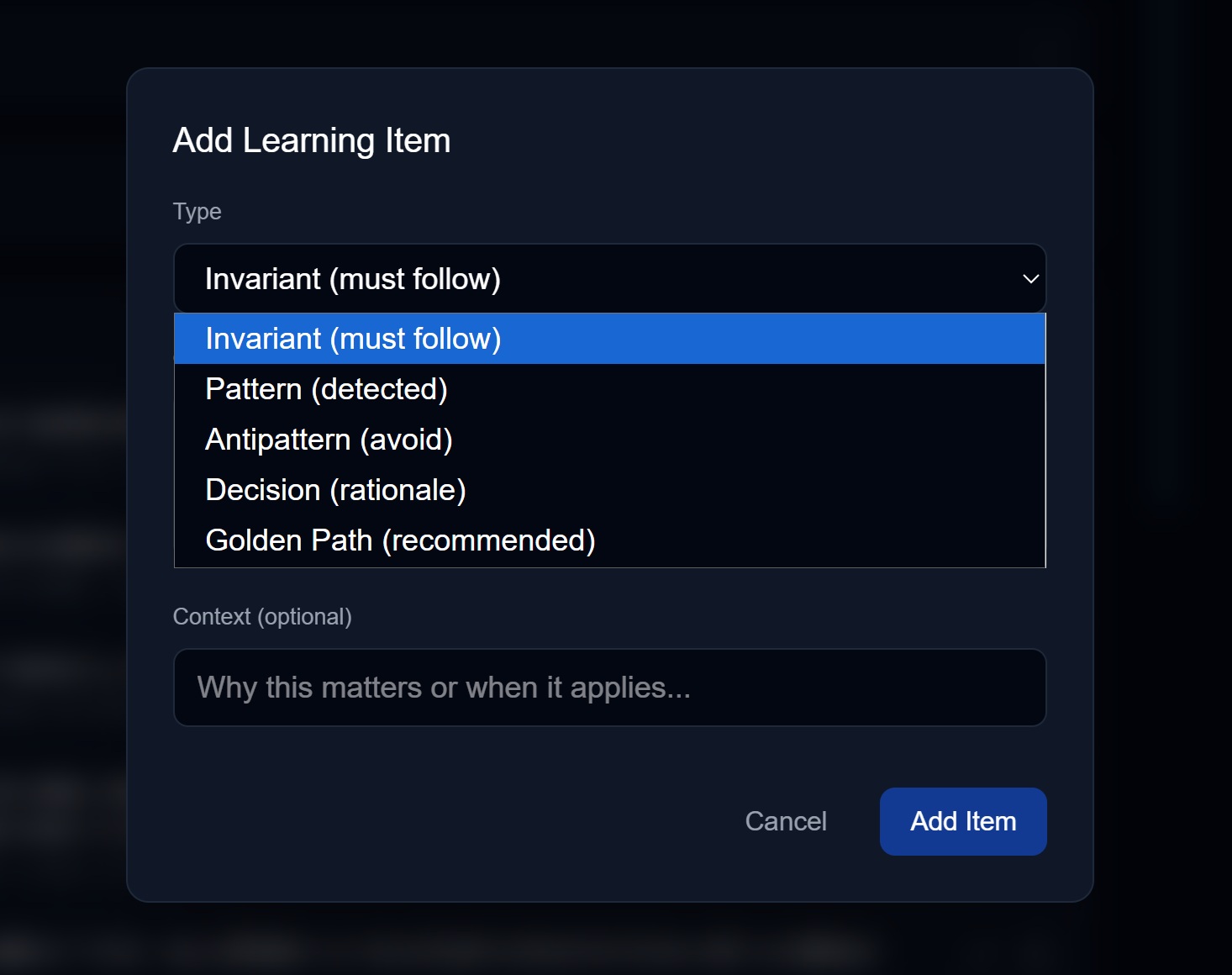
- Go to Settings → Memory & Learning → Learned Knowledge
- Click + Add Learning Item
- Select the type from the dropdown
- Enter the content
- Optionally add context (why this learning matters)
- Save
Tips for good learnings:
| Do | Don’t |
|---|---|
| Be specific to your project | Add generic programming advice |
| Include context/rationale | Just state facts without “why” |
| Keep it concise (1-2 sentences) | Write paragraphs |
| Make it actionable | Be vague or abstract |
Reviewing Pending Learnings
When the analyzer or an MCP agent proposes a learning:
- It appears in the Pending Learnings section
- Review the proposed content and type
- Choose:
- Approve — Add to memory as-is
- Edit — Modify before approving
- Deny — Reject the proposal
The source is shown (e.g., “analyzer”, “claude-code”, “cursor”) so you know where it came from.
How Learning Types Age
Not all knowledge ages the same way. Just as humans remember different types of information for different lengths of time, Chorum’s Learning Engine applies per-type decay curves that mirror how each knowledge type naturally ages.
The Cognitive Model
Human memory doesn’t decay uniformly. A traumatic warning (“don’t touch the hot stove”) stays vivid for life. A procedural skill you practiced once (“how to reset the router”) fades in weeks. Architectural understanding (“why we built the system this way”) compounds over time rather than decaying.
Chorum models this same behavior:
Code Domain:
| Learning Type | Decay Rate | Human Memory Parallel |
|---|---|---|
| Invariant | No decay (always 1.0) | Threat/constraint memory — “Never do X” warnings stay perpetually vivid |
| Decision | 365-day half-life | Episodic memory with high salience — Major life decisions compound, don’t fade |
| Pattern | 90-day half-life | Procedural memory — Skills stabilize quickly, stay relevant for months |
| Golden Path | 30-day half-life | Working procedures — Step-by-step recipes get stale as tools change |
| Antipattern | 14-day half-life | Inhibitory learning — “Don’t do X” loses relevance as you internalize the lesson |
Writing Domain:
| Learning Type | Decay Rate | Rationale |
|---|---|---|
| Character | No decay (always 1.0) | Characters are permanent — Marcus is always Marcus |
| World Rule | No decay (always 1.0) | World rules are the invariants of fiction |
| Voice | 365-day half-life | Style decisions are architectural, lasting the whole project |
| Setting | 365-day half-life | Settings rarely change once established |
| Plot Thread | 90-day half-life | Plot threads stay relevant across chapters until resolved |
Why This Matters
Before per-type decay:
- A 6-month-old invariant (“never log PII”) scored the same as a 6-month-old antipattern (“don’t use that deprecated API”)
- Both would have a recency score of ~0.05, making them equally likely to be ignored
- Critical rules disappeared from context just because they were old
After per-type decay:
- Invariants never lose recency (always 1.0) — they surface whenever semantically relevant
- Decisions age gracefully (0.83 recency after 90 days, 0.50 after a year)
- Antipatterns fade quickly (0.50 after 2 weeks, 0.02 after a month) as you internalize the lesson
The Half-Life Model
Chorum uses exponential decay with type-specific half-lives:
recency = e^(-daysSince × ln(2) / halfLife)What this means:
- At
halfLifedays, recency drops to 0.50 - At
2 × halfLifedays, recency drops to 0.25 - Each type has a floor — a minimum recency it never drops below
Example: A 90-day-old pattern
- Half-life: 90 days
- Recency: 0.50 (exactly at half-life)
- Floor: 0.15 (even after years, it contributes something)
Example: A 90-day-old invariant
- Half-life: None (no decay)
- Recency: 1.0 (same as day 1)
- Floor: 1.0 (perpetual)
Why Antipatterns Fade Fast
Antipatterns are inhibitory learning — they teach you what NOT to do. In cognitive science, inhibitory memories serve their purpose quickly:
- Week 1: “Don’t use
anytype” — you see it, you remember - Week 2: You’ve internalized it, you don’t need the reminder
- Month 1: The antipattern is now part of your implicit knowledge
After 14 days (one half-life), the antipattern’s recency is 0.50. After 30 days, it’s near the floor (0.02). This is intentional — if you’re still making the same mistake after a month, the problem isn’t memory retrieval, it’s something else.
Why Decisions Compound
Architectural decisions are different — they gain importance over time:
- Day 1: “We chose PostgreSQL over MongoDB”
- Month 6: The entire codebase is built on PostgreSQL
- Year 1: Switching would require a complete rewrite
A decision made a year ago isn’t “stale” — it’s foundational. The 365-day half-life means a year-old decision still has 0.50 recency, and the floor of 0.30 ensures it never becomes irrelevant.
This mirrors how humans remember major life decisions: they don’t fade, they become part of your identity.
Why Invariants Never Expire
Invariants are constraints — rules that define the boundaries of acceptable behavior. In human cognition, these are processed by the amygdala (threat detection) and prefrontal cortex (rule enforcement):
- “Never touch a hot stove” — learned once, remembered forever
- “Never share passwords” — doesn’t become less true over time
- “All API routes require auth” — perpetual requirement
Chorum treats invariants the same way: zero decay, perpetual relevance. An invariant learned 3 years ago scores identically to one learned yesterday. If it’s semantically relevant to your query, it surfaces.
Related Documentation
- Memory Overview — How the memory system works
- The Conductor — See, steer, and tune memory injection
- Relevance Gating — How learnings are scored and selected
- Tiered Context — How memory adapts to different model sizes
- Memory Management — Editing and organizing your learnings